
1. Overview
Momentum strategies are among the most common and practical trend-enhancement approaches in quantitative trading.
They are based on one core assumption:
“The strong stay strong, the weak stay weak.”
Assets that have performed strongly in the recent past are more likely to continue rising; assets that have performed poorly are more likely to remain weak.
In PulseForce, the built-in momentum strategy is not a naive model that only looks at recent returns. Instead, it integrates:
- EMA crossovers (
ema_fast/ema_slow) – to confirm the direction of short-term and medium-term trends - Recent high breakout (
recent_high_window) – to confirm whether price has truly broken above recent resistance levels - RSI momentum signal (
rsi_period/rsi_buy_threshold/rsi_sell_threshold) – to measure the strength of buying vs. selling pressure - Volume expansion (
volume_window) – to confirm that the up move is driven by real capital, not “thin-volume spikes” - CatBoost AI filter (optional) – an AI model that filters out low-quality signals on top of the base rules
At the same time, the strategy manages risk and position sizing through:
- Hard take-profit / stop-loss (
force_take_profit/force_stop_loss) - Daily take-profit / stop-loss (
daily_take_profit/daily_stop_loss) - Dynamic capital allocation (
allowable_funds_*)
and supports HyperOpt-based automatic search for optimal parameter combinations within PulseForce.
2. Brief history and evolution of momentum
The momentum effect has very solid academic foundations and long-term empirical support:
- In 1993, the classic paper by Jegadeesh & Titman systematically demonstrated that
buying past winners and selling past losers can generate significant excess returns. - Subsequent research found that the momentum effect exists across:
equities, futures, FX, commodities, indices, and even cryptocurrencies.
In live trading, momentum strategies are widely used for:
- Short- and medium-term trend trading
- Sector / industry rotation
- Multi-asset long/short portfolios
- Trend filters in higher-frequency systems
PulseForce’s Momentum strategy is an enhanced version built on top of these classic ideas, with additional multi-indicator confirmation and AI-based signal filtering.
3. What problems does this Momentum strategy aim to solve?
The momentum strategy in PulseForce is designed to address several real-world challenges:
Return-only momentum is unstable; we need multi-dimensional confirmation of “true momentum”.
→ Use EMA crossovers + recent high breakout + RSI + volume together to form a joint decision.How to avoid “fake breakouts” and “fake pumps”?
→ Price must break above a recent high and volume must expand.How to get in early when the trend accelerates, instead of entering too late?
→ Use recent breakouts + elevated RSI as “trend acceleration” signals.How to reduce invalid signals and drawdowns?
→ Add a CatBoost AI model on top of base rules to filter some signals, and use multi-layer TP/SL logic to manage exits.
4. Core indicators and signal logic
4.1 Core technical indicators
In the momentum strategy, the key indicators (all computed on 1-minute bars) are:
| Indicator | Meaning |
|---|---|
ema_fast |
Fast EMA, more sensitive, represents short-term momentum |
ema_slow |
Slow EMA, represents medium- to long-term trend direction |
recent_high |
Highest price over a period (recent_high_window), used to confirm breakout |
rsi |
Relative Strength Index, used to measure short-term buying strength |
volume_mean |
Average volume over a period, used to detect volume expansion |
Corresponding indicator calculations in code (excerpt):
1 | df["rsi"] = ta.RSI(df, timeperiod=rsi_p).fillna(0) |
4.2 Trend labels: short trend / long trend / daily trend
Based on EMAs, the strategy additionally labels:
short_trend: determined by the relationship betweenema_fastandema_slowlong_trend: computed from a combination of longer-period EMAsdaily_short_trend/daily_trend: daily-level trends derived by resampling 1m data to 1D
These trend fields can be used for:
- Features for future AI models
- Extensions to risk control modules
- More intuitive trend-state visualization in the UI
5. Core buy/sell logic (Runner + AI filter)
5.1 Buy signal: breakout + strong momentum + volume expansion + EMA bull trend + AI filter
In populate_buy_trend, the logic used by the Runner can be summarized as:
1 | # 1) Base momentum condition in the Runner |
In plain English, the buy logic of this Momentum strategy can be described as:
“When price breaks above a recent high + RSI is strong + volume expands + EMAs are bullish, we consider this a strong momentum breakout. If the AI model also judges this signal to be high quality, then an official buy signal is generated.”
5.2 Sell signal: momentum decay + SL/TP combination
The strategy does not simply exit on an EMA death cross. Instead, it defines a “momentum decay signal layer” _has_sell_signal:
1 | def _has_sell_signal(self, row: pd.Series) -> bool: |
Meaning:
- Close price falls below
ema_fast→ short-term momentum is weakening - RSI falls below
rsi_sell_threshold→ overbought / strong phase has ended
The actual exit logic is implemented in custom_exit:
1 | # ① Hard stop-loss / hard take-profit (independent of momentum signal) |
In summary, this exit logic:
- Provides a “hard TP/SL safety net” to protect capital in extreme scenarios.
- Does not exit casually in normal conditions; it first waits for a momentum decay signal.
- Only exits when “momentum decay + daily SL/TP threshold” are both triggered.
Compared to simple “sell at stop-loss” or “exit on EMA cross”, this is more nuanced and allows the strategy to hold positions as long as the trend persists.
6. PulseForce parameter configuration and HyperOpt
The PulseForce app (available on Apple App Store and Google Play) provides visual configuration interfaces for live tasks, backtests, and hyper-parameter optimization, making the strategy fully parameterized.
Backtest parameter configuration screen: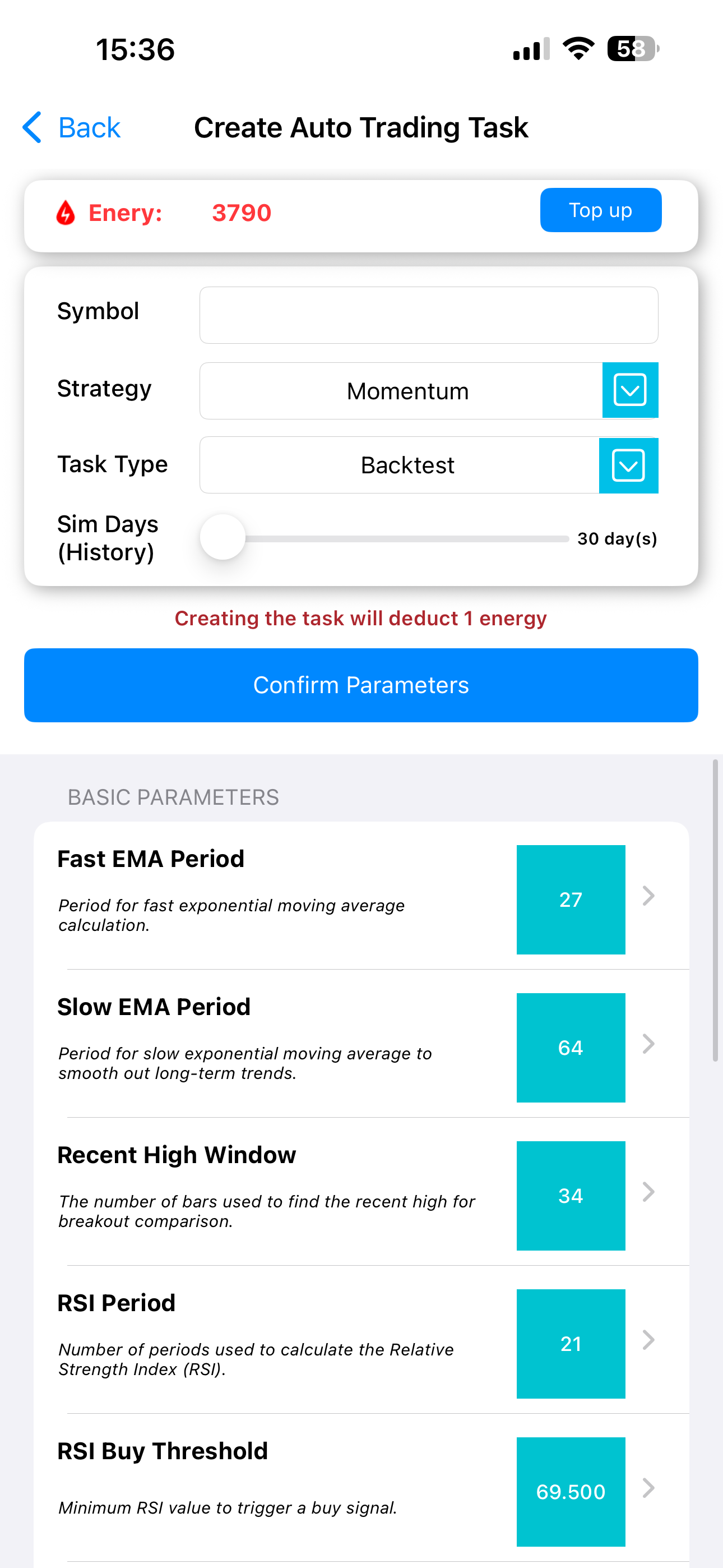
Hyper-parameter optimization configuration screen: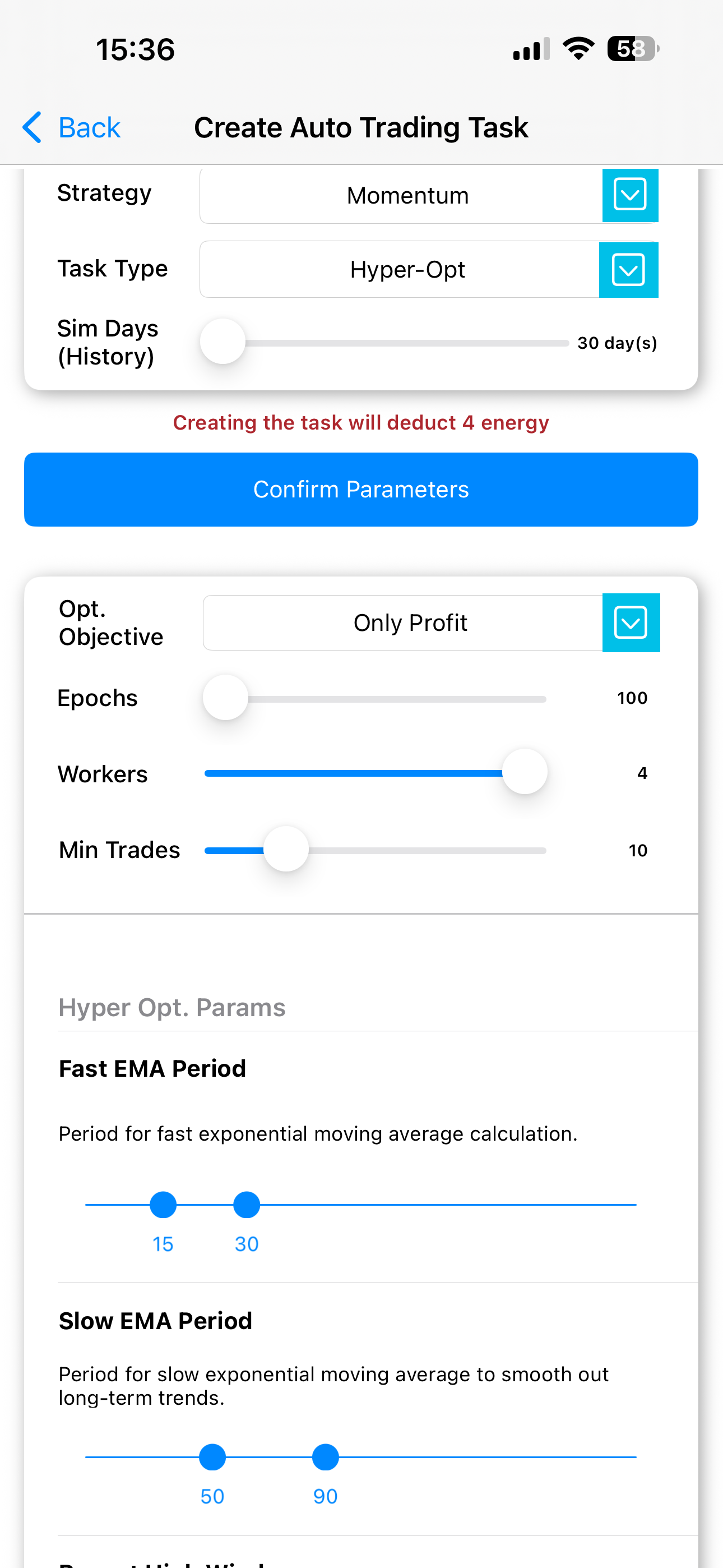
6.1 Core parameter group
This group defines the core structure of the momentum signal, and all parameters support HyperOpt:
| Key | Name | Role | Optimizable | Suggested initial search range (otp_init_min ~ otp_init_max) |
|---|---|---|---|---|
ema_fast |
Fast EMA Period | Fast EMA period; smaller values react more quickly | ✅ | 15 ~ 30 |
ema_slow |
Slow EMA Period | Slow EMA period, smoothing medium- to long-term trend | ✅ | 50 ~ 90 |
recent_high_window |
Recent High Window | Lookback window used to compute “recent high” | ✅ | 20 ~ 45 |
rsi_period |
RSI Period | Period for RSI calculation | ✅ | 10 ~ 25 |
rsi_buy_threshold |
RSI Buy Threshold | Minimum RSI required to trigger a buy signal | ✅ | 60 ~ 75 |
rsi_sell_threshold |
RSI Sell Threshold | Maximum RSI at which a sell signal is considered (momentum decay level) | ✅ | 20 ~ 45 |
volume_window |
Volume MA Window | Window length used to calculate average volume | ✅ | 10 ~ 30 |
These parameters map directly to the HyperOpt search space in code:
1 | ema_fast # IntParameter(15, 30, ...) |
6.2 Capital management parameters
In PulseForce, these parameters mainly control maximum usable capital and trend-based allocation, and are currently user-configurable but not included in HyperOpt by default:
| Parameter | Meaning |
|---|---|
max_funds_allowed_using |
Maximum capital that this strategy is allowed to deploy |
allowable_funds_neutral |
Capital ratio used in neutral market conditions |
allowable_funds_uptrend |
Capital ratio used in uptrend conditions |
allowable_funds_downtrend |
Capital ratio used in downtrend conditions |
You can adjust these values in the PulseForce app according to your risk preferences. For example:
- In strong trending markets, you might set
allowable_funds_uptrendto 1.0 - In uncertain markets, you can lower
allowable_funds_neutralandallowable_funds_downtrend
6.3 Stop-loss parameters
This group is the core of risk control, and all parameters support HyperOpt:
| Key | Name | Description | Optimizable | Search range |
|---|---|---|---|---|
force_stop_loss |
Force Stop-Loss Ratio | Hard exit when loss reaches this ratio, regardless of signal | ✅ | 0.005 ~ 0.30 (config), or 0.01 ~ 0.1 (HyperOpt) |
daily_stop_loss |
Daily Stop-Loss Ratio | Only when a sell signal appears, trigger stop-loss if loss exceeds this | ✅ | 0.005 ~ 0.30 (config), or 0.01 ~ 0.1 (HyperOpt) |
Note:
- Force stop-loss is a permanently active hard defense.
- Daily stop-loss is only evaluated when
_has_sell_signalis true.
6.4 Take-profit parameters
These also support HyperOpt:
| Key | Name | Description | Optimizable | Search range |
|---|---|---|---|---|
force_take_profit |
Force Take-Profit Ratio | Hard exit when profit reaches this ratio, regardless of signal | ✅ | 0.005 ~ 0.30 (config), or 0.01 ~ 0.1 (code) |
daily_take_profit |
Daily Take-Profit Ratio | When a sell signal appears, exit if profit exceeds this threshold | ✅ | 0.005 ~ 0.30 (config), or 0.01 ~ 0.1 (code) |
Overall:
- The Force parameters act as a hard logic layer for black-swan protection / locking extreme gains.
- The Daily parameters are a softer logic layer for finding reasonable exit points within a trend.
Within the PulseForce HyperOpt environment, these four parameters can be optimized per symbol to find more suitable ranges.
7. Use cases and characteristics
7.1 Suitable scenarios
- Assets with significant volatility and clear trends (e.g., US growth stocks, popular ETFs, cryptocurrencies)
- Short-term trend trading on 1-minute or 5-minute bars
- Symbols with stable liquidity that frequently generate breakout moves
- Research/live environments where you want to use HyperOpt to search for “best parameter combinations”
7.2 Less suitable scenarios
- Symbols stuck in long-term narrow ranges without clear breakouts or trends
- Extremely illiquid stocks (where prices jump in large ticks)
- Ultra-short-term, news-driven markets that require much faster reaction logic
8. Strengths and limitations
Strengths
- Combines EMA crossover + breakout + RSI + volume → “true momentum” with multi-factor confirmation
- Adds AI filter (CatBoostMomentumPlugin) to reduce low-quality signals
- More nuanced exit logic: momentum decay + SL/TP combined decision
- Full HyperOpt support, easy to tune per symbol
- Deep integration with PulseForce’s UI / backtesting / HyperOpt modules
Limitations
- Compared to simpler pure momentum models, this strategy is more complex and requires higher data and backtesting quality
- In long-lasting choppy markets, breakouts and strong momentum events are rare, resulting in fewer trades
- The AI filter depends heavily on model quality; if trained poorly, it may filter out good signals instead
9. Summary
The built-in momentum strategy in PulseForce is an enhanced trend-following strategy constructed on top of classic momentum ideas, with added multi-indicator confirmation and AI filtering:
- Uses fast/slow EMA to determine trend direction
- Uses recent high breakout + strong RSI + volume expansion to confirm momentum quality
- Uses an AI model (CatBoostMomentumPlugin) to review each base buy signal
- Uses hard/daily take-profit and stop-loss to manage risk
- Uses HyperOpt hyper-parameter optimization to search for optimal parameter combinations per symbol
For users who want to build a “smarter momentum strategy” inside PulseForce, this is a solid and extensible building block.
To learn more about strategy details and the latest features, please visit:
👉 PulseForce official website: https://www.hiforce.ai