— The automated quantitative engine that finds the best answers for your strategy

In quantitative trading, strategy parameters define behavioral patterns.
With the same strategy logic but different parameter values, your equity curve, drawdown level, win rate, and trade frequency can all change dramatically.
For example:
- MA Crossover short/long moving averages
- Momentum window size
- RSI Reversal overbought/oversold thresholds
- Bollinger Bands standard deviation multiplier
- MACD fast / slow / signal values
Different combinations lead to drastically different:
- Annualized return
- Maximum drawdown
- Sharpe / Sortino / Calmar ratios
- Trading frequency and holding duration
- Overall stability and robustness
However, manual parameter tuning is nearly impossible:
- A typical strategy has 5–15 parameters
- Each parameter may have 10–200 possible values
- Total combinations easily reach 10⁶–10⁹
- Each backtest requires processing large amounts of historical OHLCV data
Which means:
Tuning parameters by hand ≈ a nearly impossible mission.
To solve this, PulseForce introduces Intelligent Hyper-parameter Optimization, letting the system automatically search, evaluate, and select the “higher returns, lower drawdown, more stable” parameter sets for you.
This was once a capability exclusive to institutional quants — now available to every PulseForce user.
1. Why Do You Need Intelligent Hyper-parameter Optimization?
1.1 Parameters Shape a Strategy’s “Personality”
The logic of a strategy may be fixed, but parameters define its personality:
- Aggressive vs. conservative?
- Trend-following vs. swing trading?
- Stop-loss too tight or too loose?
- Does it exit too early or miss opportunities?
A good parameter set improves:
- Profitability
- Drawdown smoothness
- Win rate balance
- Risk–reward profile
A poor parameter setup can turn a good strategy into a “loss generator.”
1.2 Different Stocks Require Different Parameters
Each stock behaves differently:
- AAPL: smooth structure, balanced volatility
- NVDA: high volatility, explosive trends
- TSLA: sentiment-driven, fast direction shifts
Using one single parameter set for all symbols usually results in:
- Mediocre performance on some stocks
- Severe distortion and long-term losses on others
HyperOpt gives each stock its own customized parameter set.
1.3 The Market Constantly Changes
Markets cycle through:
- Trending conditions
- Range-bound / mean-reverting conditions
- High volatility
- Low volatility
- Event-driven shocks
The best parameters for the last 90 days may be outdated in the next 90 days.
With HyperOpt, you can:
- Periodically “recalibrate” your strategy
- Adapt parameters to current market conditions
- Avoid relying on old and stale configurations
1.4 Manual Parameter Tuning: Impossible Workload
If you try tuning manually, you will:
- Adjust parameter A → run backtest → record result
- Adjust parameter B → run backtest → compare curves
- Test dozens or hundreds of combinations
- Still worry:
- “Did I miss a better combination?”
- “Is this overfitted?”
- “Is this stable?”
HyperOpt solves all this automatically.
2. What Can Intelligent HyperOpt Do for You?
2.1 Automatically Find the Best Parameter Combination
PulseForce explores tens of thousands of combinations (or more), evaluating them intelligently to find the best-performing set.
Optimization considers:
- Annualized return
- Max drawdown
- Sharpe ratio
- Sortino ratio
- Calmar ratio
- Profit-drawdown ratio
- Multi-metric scoring
PulseForce supports multiple HyperOptLoss objectives:
- OnlyProfitHyperOptLoss
- SharpeHyperOptLoss
- SortinoHyperOptLoss
- CalmarHyperOptLoss
- MaxDrawDownHyperOptLoss
- MaxDrawDownPerPairHyperOptLoss
- MaxDrawDownRelativeHyperOptLoss
- ProfitDrawDownHyperOptLoss
- MultiMetricHyperOptLoss
- ShortTradeDurHyperOptLoss
…and more
Each loss represents a different definition of “good strategy.”
2.2 Escape “Gut-feel” Parameter Tuning
Humans often:
- Stick to familiar values
- Over-focus on recent winning trades
- Fear adjusting too much
Machines, by contrast:
- Don’t get tired
- Don’t have emotions
- Follow objective scoring rules
- Systematically analyze the space
The final result is typically far superior to manual tuning.
2.3 Create Real Competitive Advantage for Your Strategy
With HyperOpt, you can:
- Derive unique parameters per symbol
- Adjust for changing market regimes
- Improve risk control and long-term stability
- Gain an edge over fixed-parameter strategies
HyperOpt becomes your strategy’s moat.
2.4 Fully Automated (Truly One-Click)
PulseForce automatically handles:
- Downloading recent 90 days of OHLCV data
- Building train/test sets
- Running multi-threaded distributed search (up to 10 workers)
- Adjusting search paths dynamically
- Early-stop and anti-overfitting mechanisms
- Score aggregation and best-parameter extraction
You only need to do:
Set ranges → Click Start.
2.5 One-click Apply to Backtests or Daily Trading Tasks
After optimization:
- One-click apply best parameters to a backtest
- One-click create a Daily Run trading task
From “best parameters” to “real execution” takes only one step.
3. Feature Details
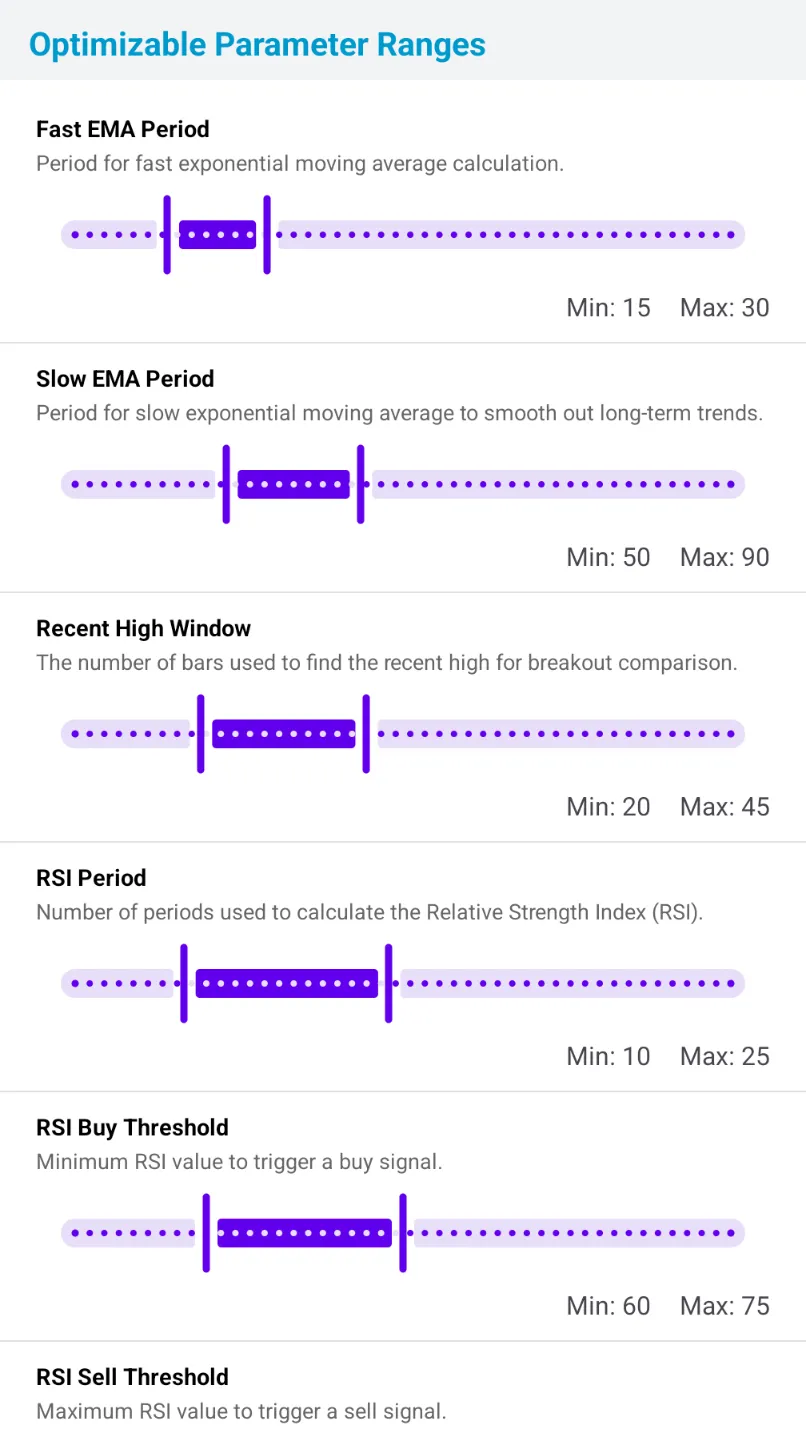
3.1 Optimizable Parameters (Visual Editor)
PulseForce provides a visual parameter editor for each strategy.
You can configure:
- Minimum value
- Maximum value
- Initial search range (otp_init_min / otp_init_max)
Choosing a reasonable initial range dramatically improves:
- Search speed
- Quality of results
- Stability
If ranges are too large:
- Search space explodes
- Workers waste time on meaningless areas
- Time increases
- Noise dominates results
Setting a good initial range lets HyperOpt:
✅ Narrow search space
✅ Converge faster
✅ Avoid extreme, useless parameter values
✅ Adapt parameters to changing markets
✅ Align with your domain knowledge
3.2 HyperOptLoss Objectives
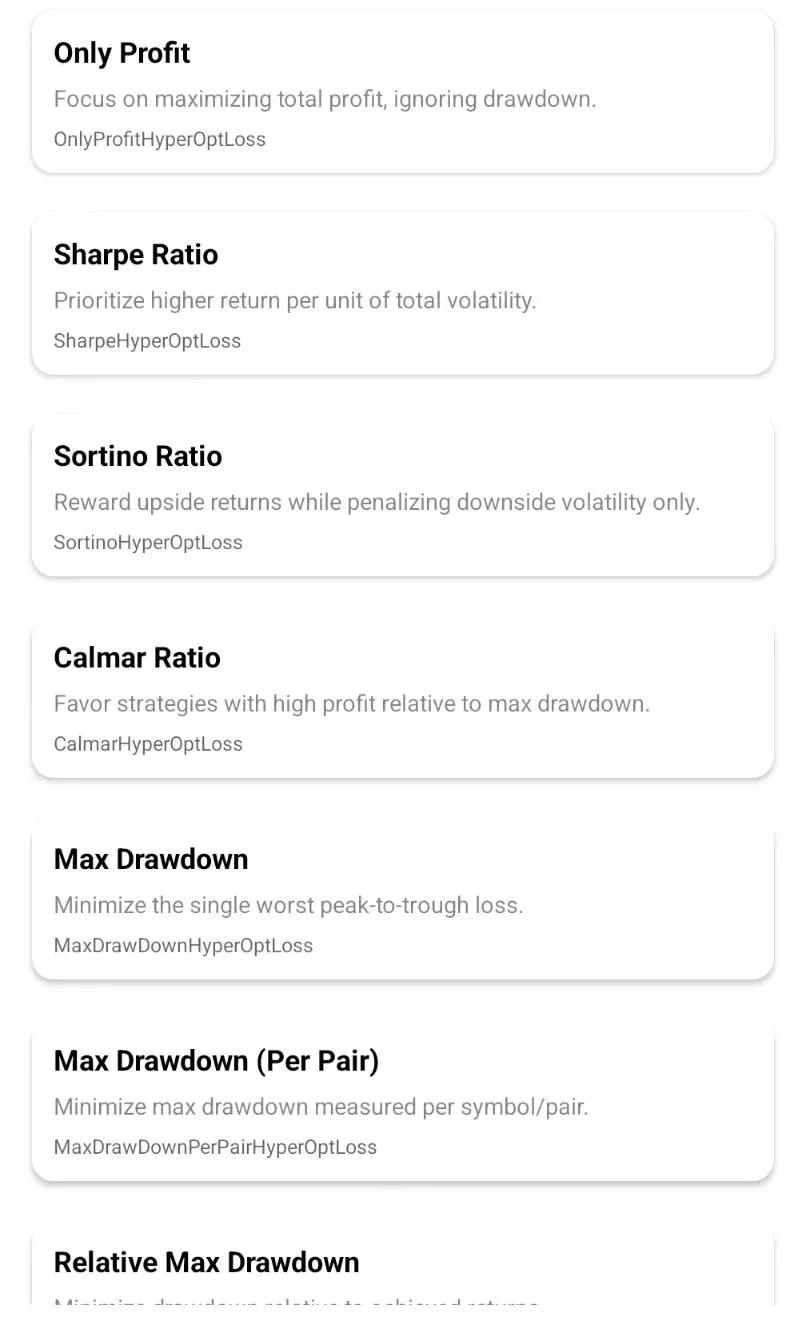
You can choose optimization goals such as:
Maximum profit
- OnlyProfitHyperOptLoss
Risk–reward focused
- Sharpe / Sortino / Calmar
Low-drawdown stability
- MaxDrawDown series
Balanced performance
- ProfitDrawDown / MultiMetric
High-frequency behavior
- ShortTradeDurHyperOptLoss
Different losses produce different flavors of “best parameters.”
3.3 Execution Settings: Epochs / Workers / Min Trades / Backtest Window
| Setting | Description |
|---|---|
| Epochs | Search rounds (50–200 recommended) |
| Workers | Concurrent threads (up to 10) |
| Min trades | Ignore results with insufficient trades |
| Backtest window | Last 90 days by default |
4. How to Use (Practical Flow)
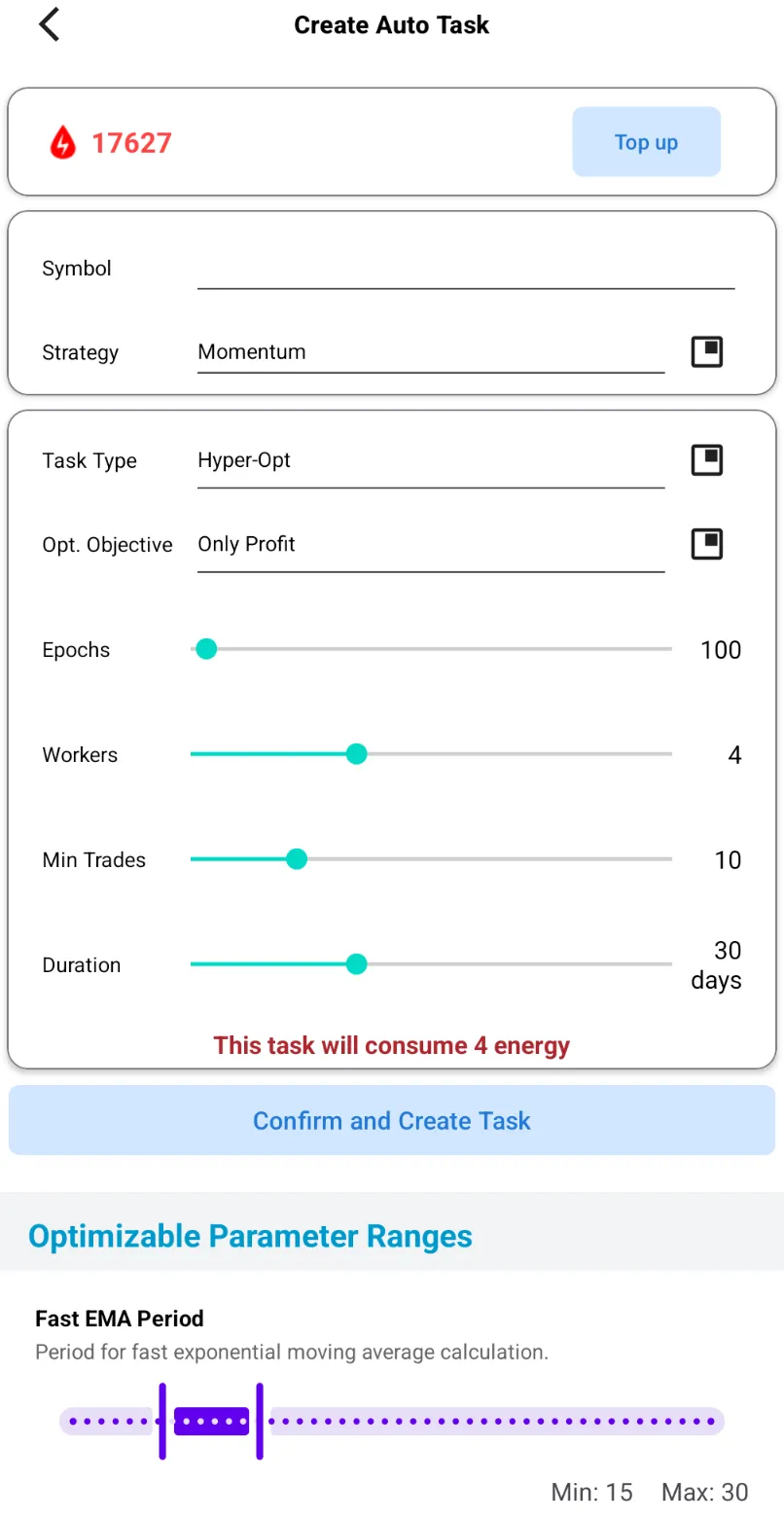
Step 1: Select Strategy & Symbol
Step 2: Configure Parameter Ranges
Step 3: Choose HyperOptLoss Objective
Step 4: Set Epochs & Workers
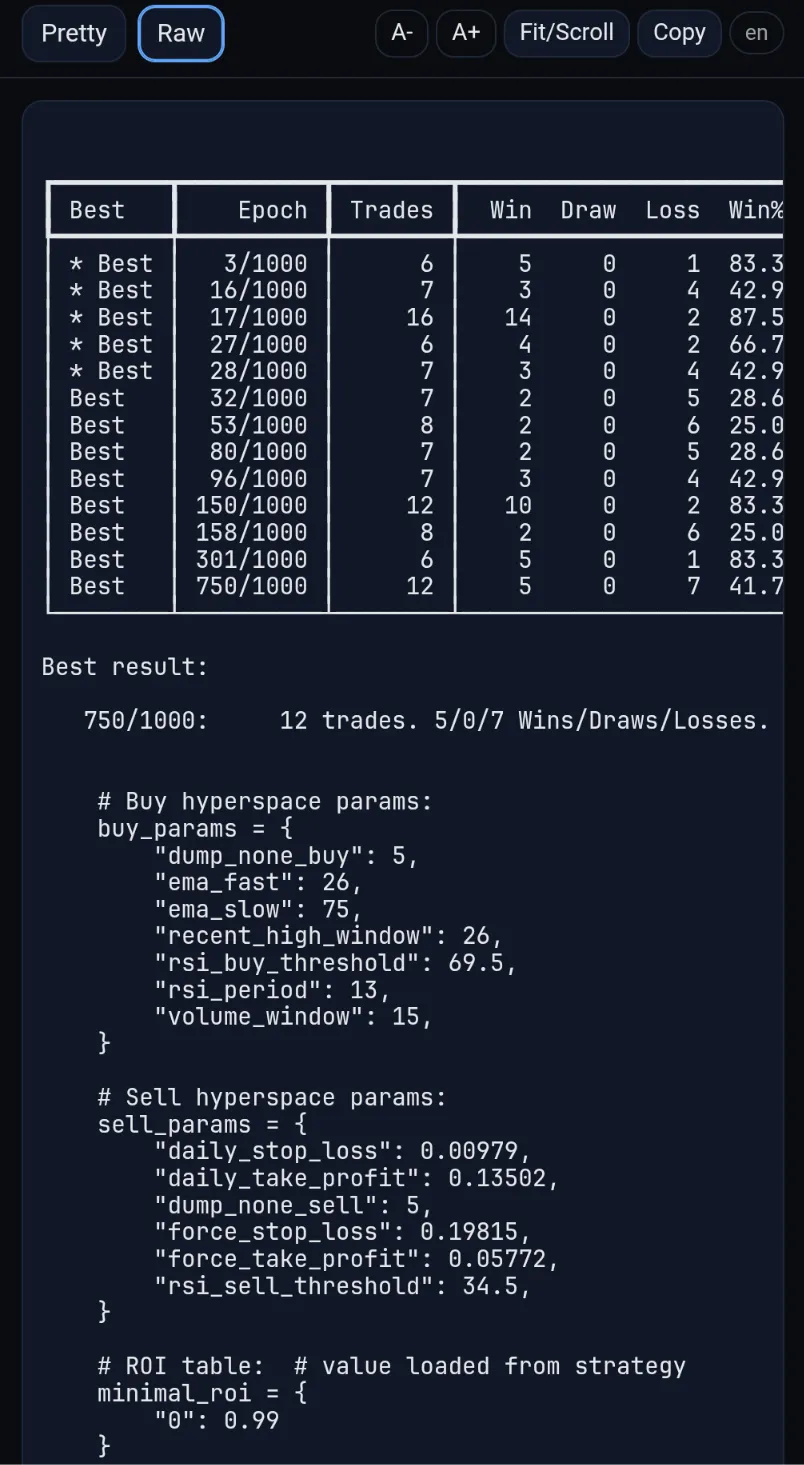
Step 5: Start Optimization & View Logs
Step 6: Apply Best Parameters
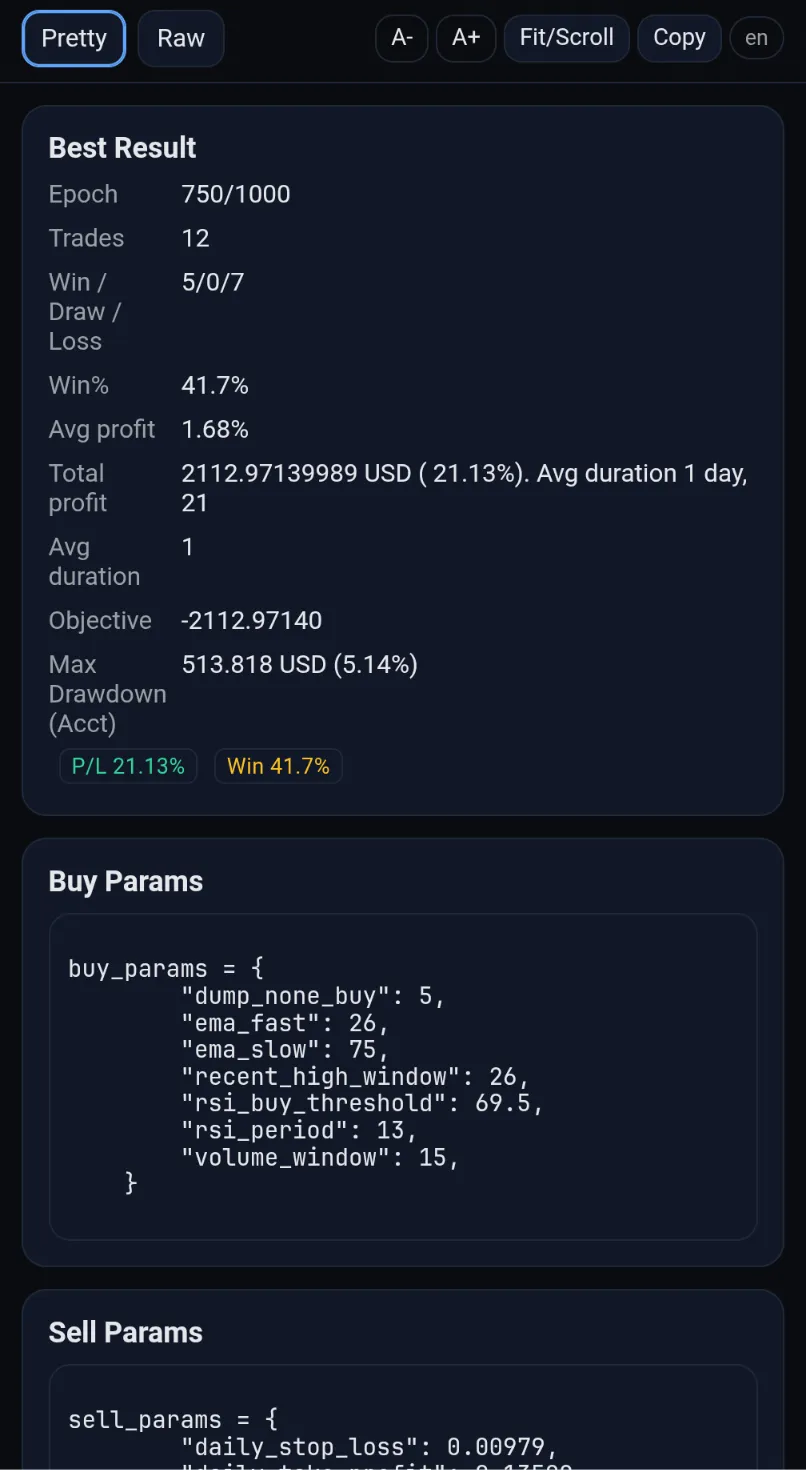
Logs include:
- Per-epoch scores
- Best loss / return / drawdown
- Best parameter set
- Curves and metrics
5. Core Algorithm (For Advanced Users)
PulseForce uses:
- Random search + Bayesian optimization
- Distributed workers (up to 10)
- Dynamic search space shrinking
- Early-stop to reduce overfitting
- Customizable scoring functions
Overall, it’s 10–20× more efficient than Grid Search.
6. Notes & Risk Disclaimer
- HyperOpt does not predict the future — it only finds strong historical parameters.
- Overfitting risk still exists.
- Re-run HyperOpt every 2–4 weeks or after major regime shifts.
- Each symbol requires its own optimized parameters.
- Avoid unreasonably large parameter ranges.
- This feature is a tool for optimization, not financial advice.
7. FAQ
Q1: Are results always identical?
No, randomness exists, but results converge with sufficient epochs.
Q2: How many epochs?
- Beginner: 50–100
- Precise optimization: 150–200
Q3: Multi-stock optimization?
Each task optimizes one symbol.
Q4: Are optimized parameters always better?
Usually yes — especially for stability metrics — but exceptions may occur.
8. HyperOpt = Turbocharger for Your Strategy
PulseForce HyperOpt:
- Scans huge parameter spaces
- Finds higher return + lower drawdown combinations
- Supports multiple optimization objectives
- Runs on distributed compute
- Applies results with one click
Your strategy becomes:
- More professional
- More stable
- More competitive
📥 Try PulseForce HyperOpt Now
Experience the difference yourself — download the latest version on Google Play:
👉 Google Play Download:
https://play.google.com/store/apps/details?id=ai.hiforce.PulseForceEu
PulseForce — helping your strategy find its best answer. 🚀