— Let AI be your strategy’s “signal quality inspector”, not a trade takeover

In quantitative trading, the strategy is responsible for “finding opportunities”.
What truly differentiates results is often this:
How well you filter out the signals that look like opportunities, but are actually noise.
The AI Momentum Plugin introduced in PulseForce is built to solve this problem.
It does not invent a new strategy for you, nor does it generate buy/sell orders directly. Instead, it works as an intelligent validation mechanism independent of strategy logic. Before a strategy executes a buy, it evaluates the current market momentum—allowing only signals that are more trend-like and more likely to persist to pass through.
PulseForce currently provides two AI momentum models for different scenarios and preferences:
- CatBoost Momentum Filter: A structured-feature model with fast inference and good interpretability, suitable for frequent backtesting, parameter optimization, and stable deployment.
- Momentum LSTM Predictor: A time-series deep learning model that is better at identifying “trend structure and momentum persistence”, suitable for short- to mid-term trend judgment and more complex momentum patterns.
1. Why Do You Need an AI Momentum Plugin?
1.1 A Common “Issue” of Trend Strategies: Many Signals, Many Noisy Signals
Trend strategies such as Momentum, moving average crossovers, and MACD trend share a common feature:
They are good at capturing trends, but they can also trigger repeatedly in sideways markets.
You may often encounter situations like:
- You buy right after a moving average golden cross, but it turns into a dead cross the next day.
- You enter when MACD turns positive, yet the price keeps moving back and forth within a range.
- You chase a Momentum breakout, but it turns out to be a false breakout.
From a statistical perspective, these trades are often “explainable noise”:
- The market does not have enough momentum to sustain continuation.
- The trend structure has not formed yet, or it is already decaying.
- The trigger happens simply because an indicator threshold is “just crossed.”
The value of the AI Momentum Plugin is to separate “threshold-triggered signals” from “real momentum.”
1.2 Intuition-Based Filtering Is Hard to Scale
Many people try manual filtering:
- “This candle is not strong enough, I won’t buy.”
- “The volume doesn’t look right, I’ll skip it.”
- “The trend looks hesitant, I’ll wait.”
The problem is:
Human judgment is hard to reproduce consistently, hard to evaluate in batches, and hard to validate systematically in backtests/optimization.
One of the key meanings of an AI plugin is:
Turn “filtering experience” into a capability that is computable, backtestable, and optimizable.
1.3 AI’s Position in PulseForce: Assisted Validation, Not Decision Takeover
PulseForce’s AI plugin design follows a core principle:
AI is a signal validator, not a trade decision maker.
- The strategy still decides when to produce a buy signal (clear, interpretable rules).
- AI evaluates whether the signal has sufficient momentum and trend continuation probability (reducing noise).
This gives the system two advantages at the same time:
- Strategy remains controllable and explainable
- AI improves quality and reduces ineffective trades
2. What Can the AI Momentum Plugin Bring?
2.1 Reduce Noisy Trades, Improve Signal Quality
The AI plugin can typically improve these experiences (especially in sideways markets):
- Reduce the chance of “buying high and pulling back immediately.”
- Reduce repeated in-and-out trades within a range.
- Improve the trend consistency and holding effectiveness of each trade.
Note: The AI plugin does not promise profits or predict the future. It simply makes strategy signals behave more like trend-trading signals.
2.2 Make Trend Strategies More “Stable” Across Market States
Markets switch between different states:
- Strong trend markets: strategy signals are more reliable.
- Sideways markets: strategy signals become noisier.
- High-volatility periods: false breakouts become more frequent.
- Low-volatility periods: trend continuation becomes weaker.
The AI Momentum Plugin is more like a simplified “market state identifier”:
When momentum is insufficient, it tends to “do less,” keeping capital and attention for opportunities that are more likely to persist.
2.3 Parameterized + Backtestable + Integrates with Hyper-Optimization
The AI plugin is not a black-box switch. It is a configurable component:
- Can be enabled/disabled freely
- Supports model selection (CatBoost / LSTM)
- Supports threshold settings (e.g.,
ai_buy_threshold) - Can be validated via backtesting
- Can include the threshold as part of the hyper-parameter search space (linked with strategy parameters)
3. Differences Between the Two AI Models and Their Use Cases
3.1 CatBoost Momentum Filter: Fast, Stable, Scales Well
CatBoost’s advantages are typically:
- Fast inference: better for frequent backtesting and parameter optimization
- Works well on structured features: technical indicators, price change rates, volatility, volume features, etc.
- Stable and controllable: low deployment cost, more predictable behavior
Best if:
- You want an AI filter that feels like a solid engineering component
- You run a large number of backtests/optimization tasks
- You prefer a robust, interpretable, and tunable filter
3.2 Momentum LSTM Predictor: Better at “Pattern Structure” in Time Series
LSTM is good at handling time-series dependencies:
- It does not only look at “indicator values at this moment”
- It looks at “how price structure evolves over a period of time”
- It is better at identifying “momentum forming/decaying” and “trend continuing”
Best if:
- You focus on short- to mid-term trend structure (not only single-point thresholds)
- You want AI to capture more complex momentum patterns
- You are willing to pay some additional training and maintenance cost (inference can still run on CPU)
3.3 How to Choose: One-Sentence Guide
- You want stability, speed, and large-scale backtesting/optimization → choose CatBoost
- You want stronger time-series pattern recognition and trend-structure judgment → choose LSTM
Many users use it like this:
- Use CatBoost as a “general-purpose filter”
- Try LSTM on key strategies / key symbols to get stronger trend recognition
4. How Does the AI Plugin Work?
The invocation point of the AI plugin is very clear:
It only happens after the strategy has generated a buy signal and before the buy is executed.
Simplified flow:
- Strategy rules are satisfied → a buy signal candidate is generated
- AI plugin reads the current context (price, indicators, sequence features, etc.)
- The model outputs a score/probability
ai_score - Compare with the threshold:
ai_score >= ai_buy_threshold→ allow the buy- Otherwise → skip this signal
You can think of it as adding a “momentum quality inspection” step before placing an order.
5. Core Parameter: Buy Threshold
The most important parameter is:
ai_buy_threshold(buy threshold)
It controls how “strict” the AI is:
- Lower threshold: more signals pass (more trades, but more noise)
- Higher threshold: stricter filtering (fewer trades, stronger-trend bias)
5.1 Practical Tuning Suggestions
- If you see too few trades and missed opportunities: lower the threshold moderately
- If you see frequent failures in sideways markets: raise the threshold moderately
- Symbols with strong trends, high volatility, and many false breakouts: typically need stricter filtering
- Symbols with stable trends and high liquidity: can use a slightly looser threshold
5.2 Hyper-Optimization Integration: Include the Threshold in Search
When running Hyper-Opt, the threshold can be an optimizable parameter.
To avoid an overly large search space, it is recommended to set a reasonable initial search range:
- Recommended initial range (for
otp_init_min / otp_init_max)otp_init_min: 0.25otp_init_max: 0.45
This helps the optimizer focus on ranges that “actually matter” and avoids wasting compute on extreme thresholds.
You can also differentiate by strategy:
- More aggressive strategies: slightly lower initial range (e.g., 0.20–0.40)
- More conservative strategies: slightly higher initial range (e.g., 0.30–0.55)
6. Applicable Strategies: Which Are Best, Which Are Not Recommended?
6.1 Strongly Recommended (Best Match for Trend Strategies)
- Momentum
- MA Crossover / Dual Moving Average
- MACD Trend
The reason is simple: these strategies assume “trend continuation.”
The AI Momentum Plugin validates exactly whether the trend is strong enough.
6.2 Use with Caution (Breakout Strategies Can Work, Mind the Threshold)
- Donchian / Breakout strategies
Breakout strategies often aim to capture the “first leg” of a move. A too-high threshold may miss early breakouts.
Recommendation:
- Avoid setting the threshold too high
- Use backtests to validate the balance between “pass rate” and “equity curve”
6.3 Not Recommended (Logical Conflict)
- RSI Reversal / KDJ Reversal and other reversal strategies
Reversal entries often occur when momentum is weak and price is heavily pressured.
Momentum-based AI tends to reject such signals, resulting in too few trades or almost no trades.
7. How to Evaluate Whether the AI Plugin Is Truly Useful?
Don’t look only at profit. Also look at “signal quality metrics”:
- Trade count change: does it significantly reduce meaningless trades?
- Average holding duration: is it more aligned with trend holding?
- Win rate / risk-reward change: does it reduce “enter-then-lose” trades?
- Drawdown curve shape: is it smoother with fewer spikes?
- Performance in sideways markets: does it reduce churn losses?
A common, healthy outcome is:
- Fewer trades
- More concentrated signals
- Smoother curves
- Better drawdown control (not guaranteed, but common)
8. Usage Steps (Practical Workflow)
Step 1: Choose Strategy + Symbol
When creating a task, choose a trend strategy (e.g., Momentum / MA / MACD) and select the trading symbol.
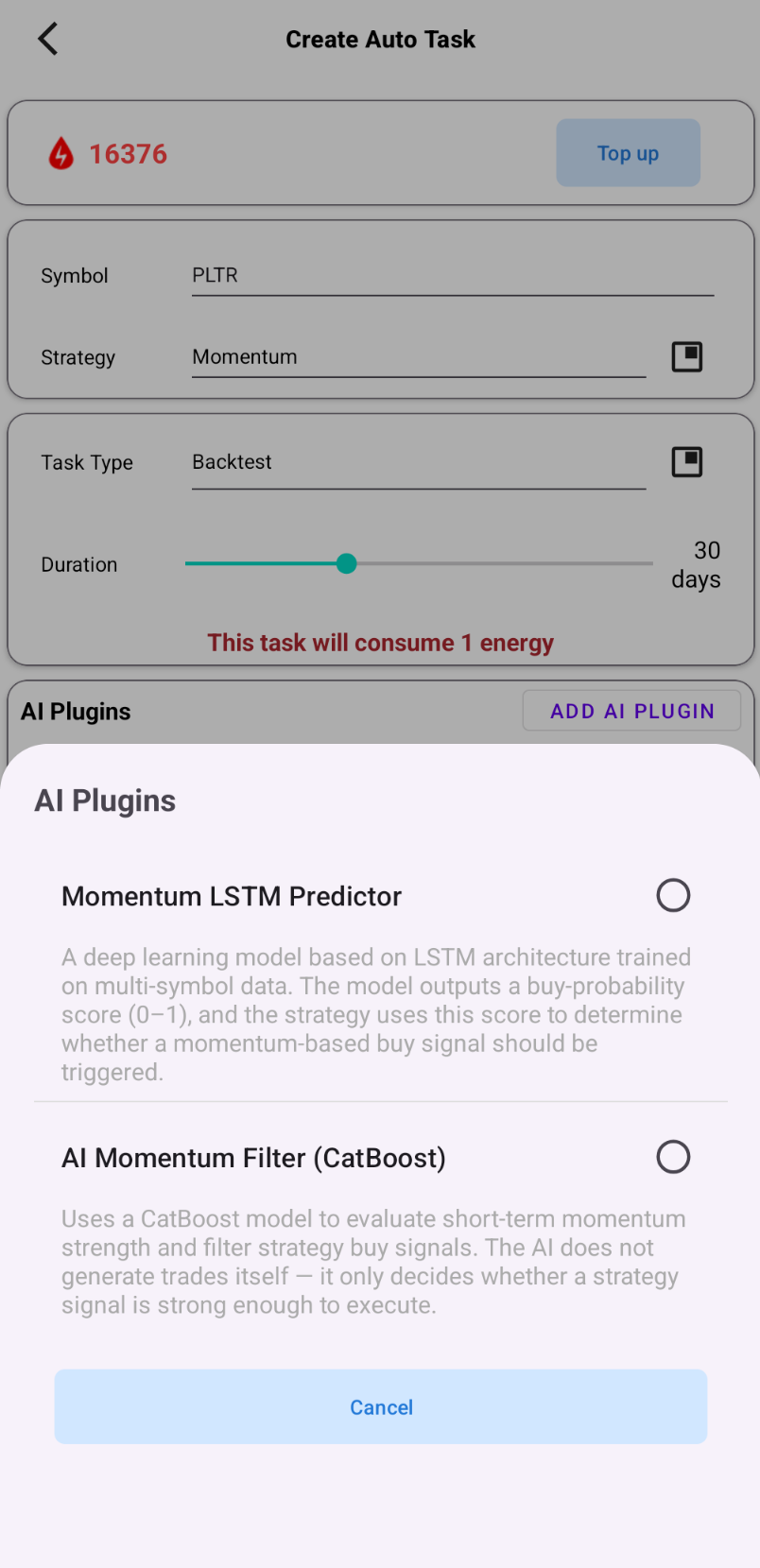
Step 2: Enable the AI Plugin and Choose a Model
- Choose CatBoost or LSTM
Step 3: Set the Buy Threshold
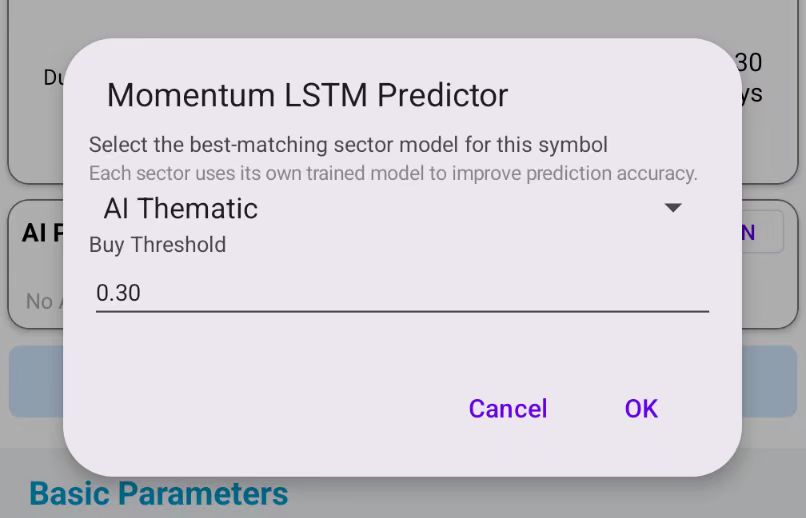
Start with a moderate threshold (e.g., 0.30–0.40), then fine-tune based on backtest results.
Step 4: Backtest and Compare
Compare two backtests:
- Same strategy & same symbol: AI ON vs AI OFF
Key comparisons: - Drawdown, curve smoothness, trade density in sideways ranges, win rate, and risk-reward ratio
Step 5: Integrate with Hyper-Optimization (Optional)
Include ai_buy_threshold in Hyper-Opt and set a reasonable otp_init_min / otp_init_max initial range to improve search efficiency.
9. Notes and Risk Reminders
- The AI plugin does not predict the future or guarantee profit: it filters signals and improves consistency
- Higher thresholds mean fewer trades: too high may filter out good opportunities
- Not recommended for reversal strategies: logical conflict can sharply reduce trades
- Backtest before live usage: especially for high-volatility symbols
- Market structure changes can affect results: re-test and adjust threshold/model choice periodically
10. FAQ
Q1: Is it normal to have fewer trades after enabling AI?
Yes. Filtering is the AI’s job. You should also check whether the curve becomes smoother and noise trades decrease.
Q2: Can CatBoost and LSTM be enabled at the same time?
In the current version, it is recommended to choose one model as the filter layer (to avoid over-filtering). If multi-layer filtering is supported in the future, clear combination guidance and recommended parameters will be provided.
Q3: What is the “best” threshold setting?
There is no universal value. Use backtests, and treat it as a hyper-parameter as important as strategy parameters.
Different symbols, strategies, and market states may require different thresholds.
Q4: Will AI “change the strategy”?
No. Strategy signals are still generated by strategy rules. AI only decides whether to execute a given signal.
11. Conclusion: Make AI Your “Signal Moat”
The real performance gap is often not about how complex your rules are, but:
- Who can filter noise more consistently
- Who can focus more on “trend-like” trades
- Who can lose less in sideways markets while still catching trends
The PulseForce AI Momentum Plugin is designed to turn this into a capability that is configurable, backtestable, optimizable, and reusable at scale.
It’s not a gimmick, and it doesn’t place bets for you. It makes your strategy behave more like a mature system: less noise, stronger consistency.
Enable the AI Momentum Plugin in PulseForce, and tune it through backtesting and hyper-parameter optimization to find the configuration that best fits your trading style.
👉 Google Play download:
https://play.google.com/store/apps/details?id=ai.hiforce.PulseForceEu